
Protecting your account from unwanted traffic
We've added new security settings to your account to help protect you against fraud and unexpected traffic. Below you'll find why it's helpful, and a simple step-by-step guide to setting it up.
Why is this helpful?
These settings give you more control over your account and help prevent surprises. In short, they let you:
- Restrict API access to only the IP addresses you trust, so your account can't be accessed from unknown or unauthorized sources.
- Set a maximum amount that can be spent per day, so a sudden spike in traffic (expected or fraudulent) can't deplete your balance.
- Get an early warning by email before you reach your spending limit, so you have time to react.
- Choose exactly which countries your traffic is allowed to reach, and automatically block the rest.
Together, these tools help you stay in control of your spending and reduce the risk of fraudulent or unauthorized traffic reaching destinations you never intended to send to.
What's new?
- IP Whitelisting — restrict API access to trusted IP addresses only.
- Daily Spending Limit — cap how much can be spent per day, either across all destinations or for specific countries.
- Country Restrictions (Geo-permission Rules) — allow or block traffic to specific countries.
Step-by-step guide
1. How do I set up IP Whitelisting?
IP Whitelisting restricts API access to only the IP addresses you specify, so your account can't be accessed via the API from unknown or unauthorized sources — even if your API key is exposed.
- Log in to your account.
- Go to API Clients > https://app.sms.to/app#/api/client
- Find the IP Whitelisting field and click on EDIT icon
- Enter the IP address(es) you want to allow API access from. You can add multiple IPs if needed and you can also use IP ranges. IPv6 example : 2001:0db8::/32. IPv4 example : 192.168.1.0/24
- Save your changes.
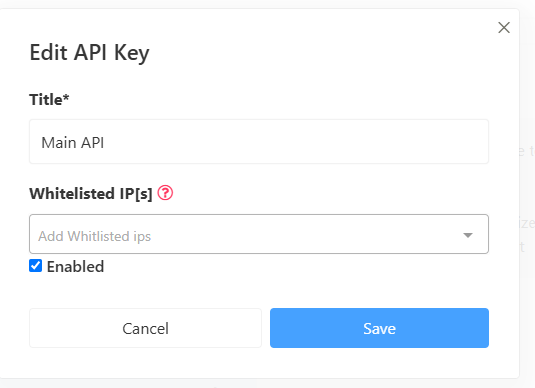
Note: Once IP Whitelisting is enabled, API requests from any IP address not on the list will be automatically rejected. Make sure to add all IPs your systems use before saving, to avoid disruption.
2. How do I activate a Daily Spending Limit?
A Daily Spending Limit lets you set a maximum amount that can be spent across all destinations in a single calendar day. Once the limit is reached, further message attempts are rejected and you'll receive a rejection notice, so you're never caught off guard.
- Log in to your account.
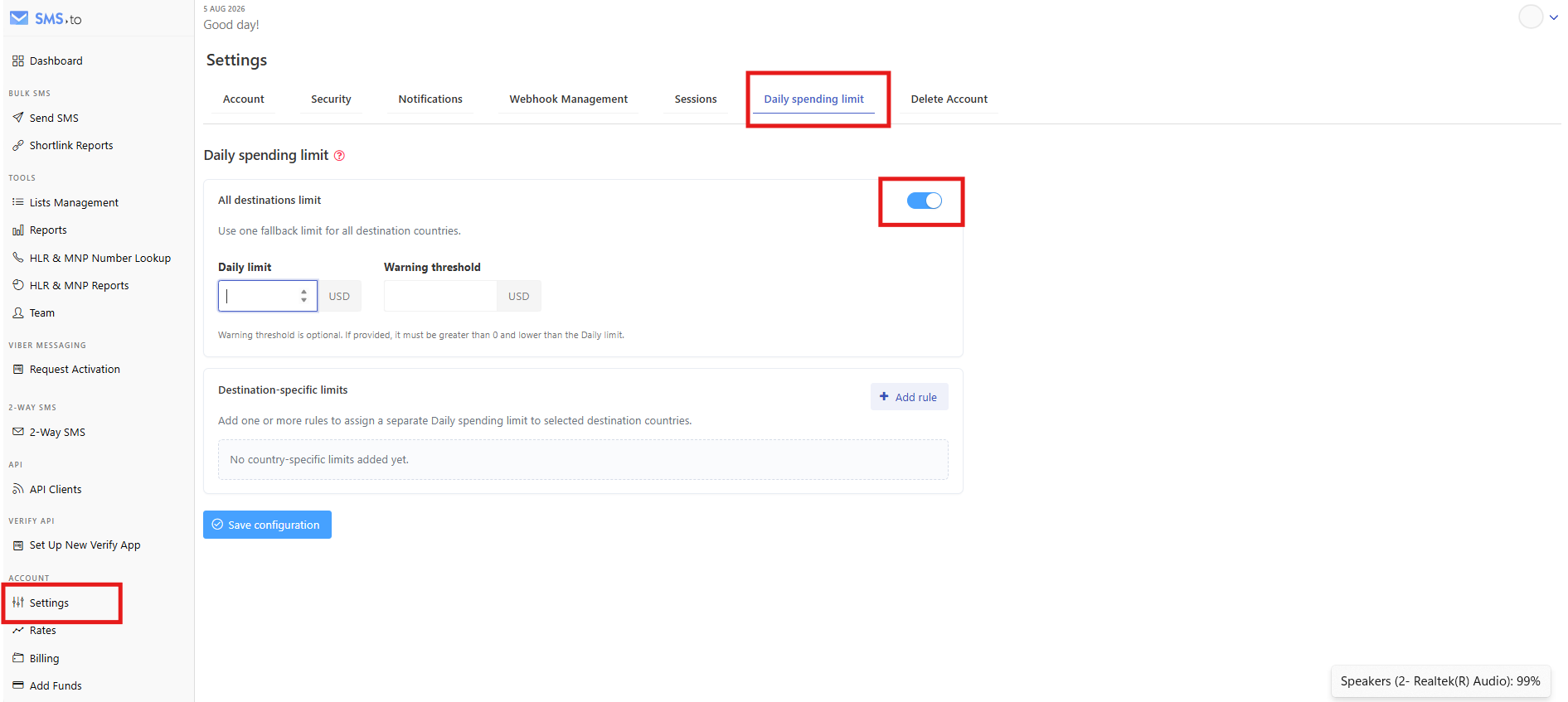
- Go to Settings > Daily Spending Limit.: https://app.sms.to/app#/settings/daily-spending-limit
- Under All destinations limit, enter the maximum amount you want to allow to be spent per day.
- (Optional but recommended) Set a Warning Threshold. This sends you an email notification before you reach your maximum limit, giving you time to check your traffic before it's cut off.
- Save your changes.
Note: Limits apply per calendar day and reset automatically at the start of the next day.
2. How do I add a spending limit for a specific country?
If you'd like tighter control over certain destinations (for example, higher-cost or higher-risk countries), you can set an additional limit that applies only to that country, on top of your all-destinations limit.
- Log in to your account.
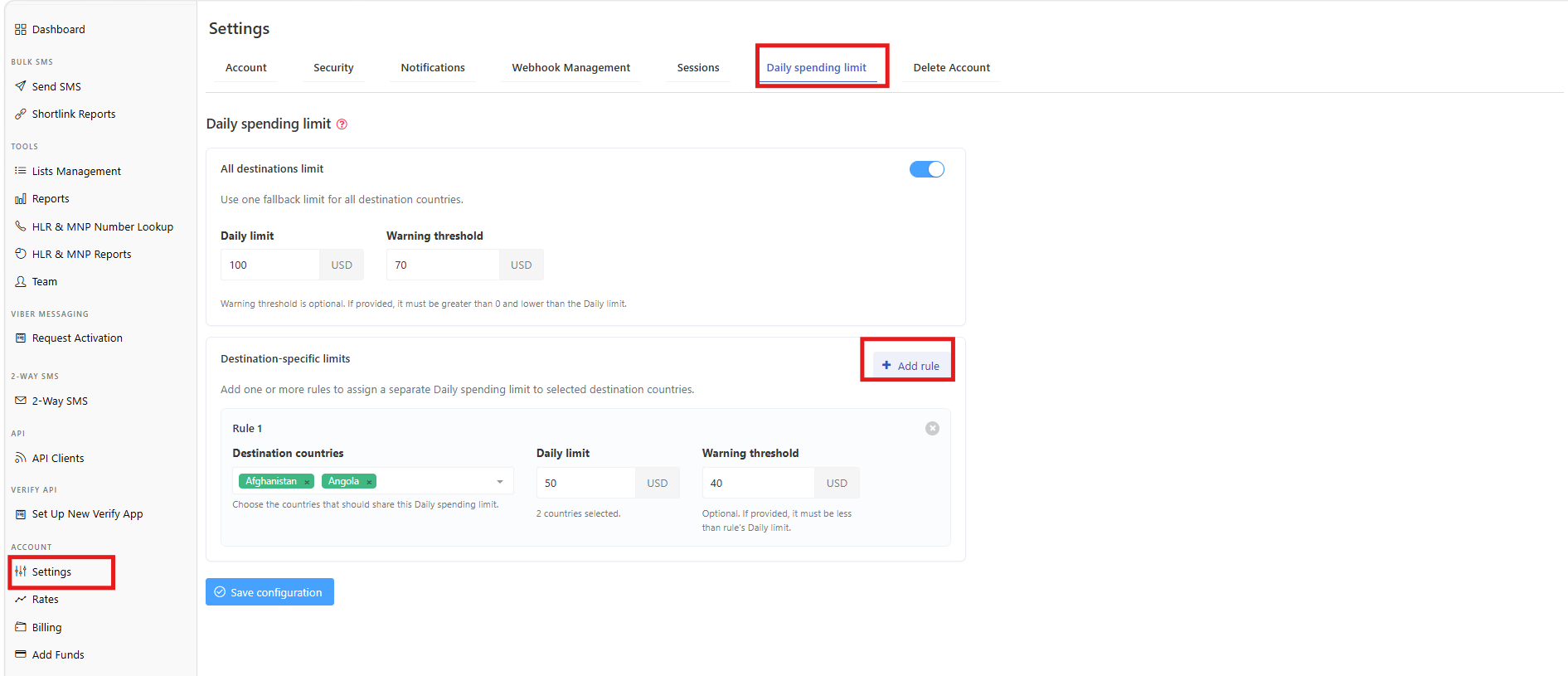
- Go to Settings > Daily Spending Limit. https://app.sms.to/app#/settings/daily-spending-limit
- Under Destination-specific limits, select Add rule.
- Choose the country and enter the maximum amount you want to allow to be spent on that destination per day.
- Save your changes.
Tip: You can add as many country-specific rules as you need. These work alongside your all-destinations limit, not instead of it.
Notes:
Limits apply per calendar day.
Daily counters reset automatically at 00:00 UTC.
When you reach a limit, message attempts are rejected.
The warning threshold sends an email notification before the limit is reached.
3. How do I set country restrictions?
Country Restrictions (also called Geo-permission Rules) let you control which countries are allowed to receive your traffic in the first place. This is a great way to block destinations you never send to, reducing the risk of unauthorized or fraudulent traffic slipping through.
- Log in to your account.
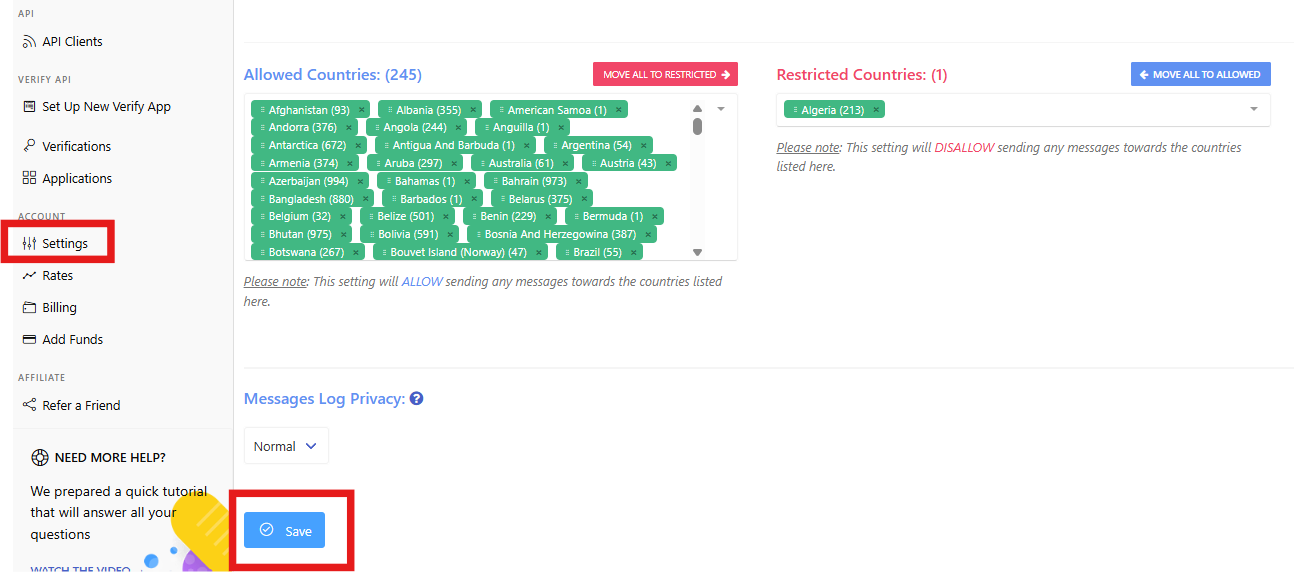
- Go to Settings > Security https://app.sms.to/app#/settings/security
- Choose the countries you want to allow, or select the countries you want to block.
- Save your changes.
Note: Any messages sent to a blocked country will be automatically rejected.
What about Auto-Recharge?
If you use Auto-Recharge to top up your balance automatically, or you're planning to turn it on, you can set the security settings from there too. https://support.sms.to/support/solutions/articles/43000635532-auto-recharge-feature
Adding a Daily Spending Limit and Country Restrictions will aslo help make sure your automatic top-ups are just as protected as the rest of your account.
If you have any questions, please send an email to support@sms.to